Every Feature. Every Plan.
No Upgrades Required.
Everything on this page is included from €29/month per listing. No additional booking fees. No feature gates. No hidden costs. And every host gets free onboarding with a dedicated account manager who'll help you set up your properties, connect your channels, and get your first bookings rolling.
Channel Manager
List on 60+ booking sites. Manage them all from one place.
What It Does
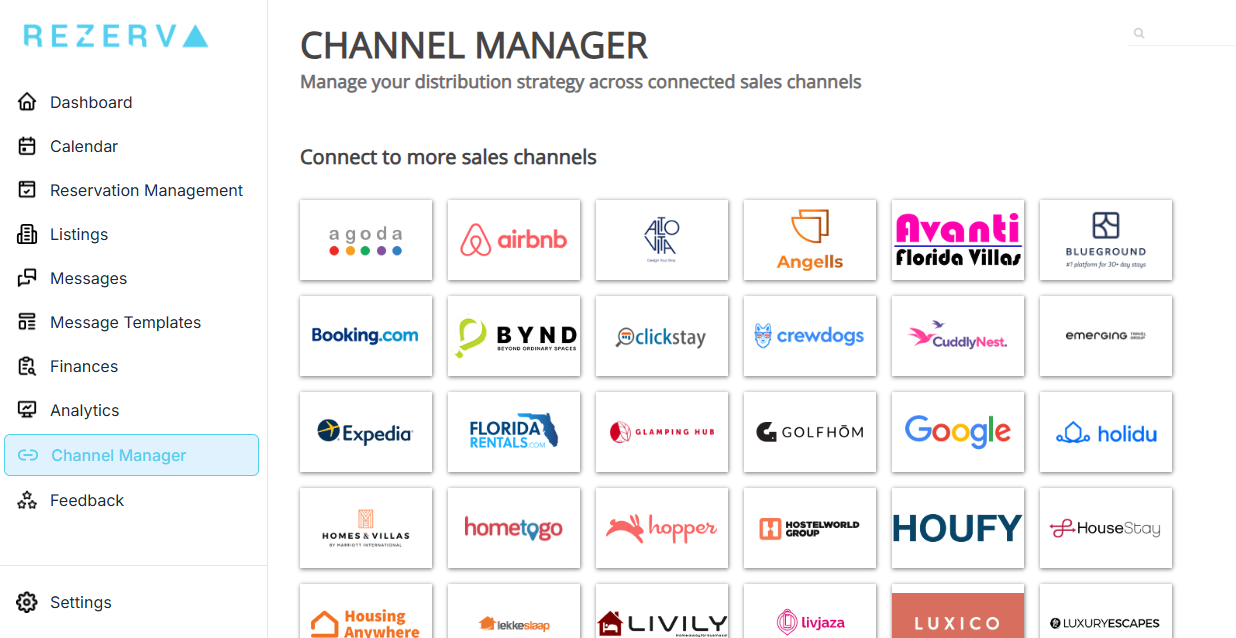
Rezerva's channel manager connects your property listing to Airbnb, Booking.com, Vrbo, Expedia, Google Vacation Rentals, Agoda, Trip.com, Holidu, and over 60 other booking platforms worldwide.
When you update something in Rezerva — your nightly rate, your availability, your minimum stay — that change is pushed to every connected channel automatically.
This works in both directions. When a guest books your property on Booking.com, Rezerva instantly blocks those dates on Airbnb, Vrbo, and every other channel you're connected to. When someone cancels, the dates open up everywhere simultaneously. No manual updates. No switching between tabs. No risk of double bookings.
Most independent hosts start on Airbnb alone, which means they're invisible to the millions of travellers who search exclusively on Booking.com, Vrbo, or Google. A channel manager lets you reach all of them without multiplying your workload.
Why It Matters
Without a channel manager, listing on multiple platforms means manually updating each one every time something changes. Miss an update and you risk a double booking — two guests arriving for the same dates. That means a forced cancellation, a potential penalty from the platform, and almost certainly a negative review.
Even hosts who use iCal links to sync calendars between platforms are exposed to this risk. iCal feeds can take anywhere from 15 minutes to several hours to update, and they only sync availability — not pricing, not minimum stays, not booking rules.
Rezerva's channel manager uses direct API connections to each platform, which means updates happen in real time and cover everything: rates, availability, restrictions, and content.
How It Works
- Create your property listing in Rezerva (or import your existing Airbnb listing).
- Connect the booking channels you want to list on. Start with Airbnb and Booking.com — add more whenever you're ready.
- Set your pricing, availability, and booking rules once in Rezerva.
- Rezerva pushes everything to all connected channels via direct API connections. Updates happen in seconds, not hours.
- When a booking comes in on any channel, all other channels are updated automatically.
Key Details
- 60+ booking channels available at launch, including Airbnb, Booking.com, Vrbo, Expedia, Google Vacation Rentals, Agoda, Trip.com, Holidu, and regional platforms
- Real-time two-way sync via direct API connections (not iCal)
- Set channel-specific pricing if needed (e.g. slightly higher rate on Booking.com to offset their higher commission)
- Add or remove channels at any time — no lock-in, no extra fees per channel
- Your dedicated account manager helps you connect your first channels during onboarding
Booking Management & Unified Calendar
Every reservation, every channel, one calendar.
What It Does
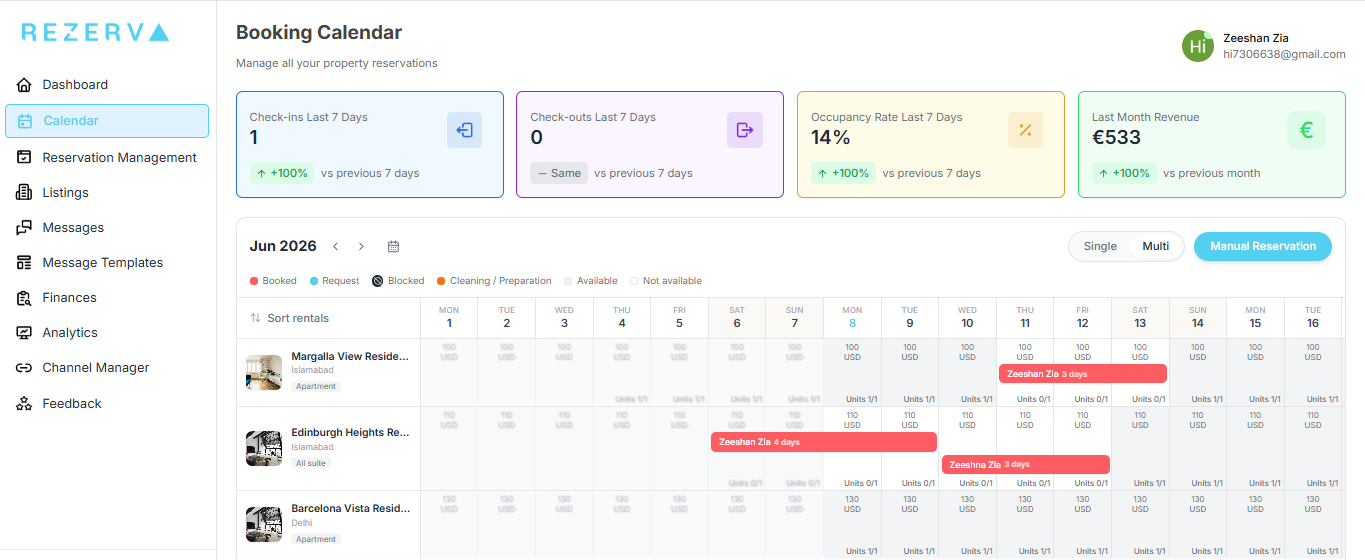
Rezerva's unified calendar shows every booking from every connected channel in a single view. Airbnb bookings, Booking.com reservations, Vrbo stays — they all appear on one calendar, colour-coded by channel so you can see at a glance where each booking came from.
Each reservation includes the details you need: guest name, check-in and check-out dates, number of guests, total payout, the channel it was booked through, and the current booking status.
No more opening Airbnb to check one booking, then switching to Booking.com to check another. Everything is in one place, always up to date.
If you manage more than one property, the calendar shows all of them. You can filter by property or view everything at once — whichever is more useful in the moment.
Why It Matters
As soon as you list on more than one booking platform, keeping track of reservations gets complicated fast. Which guest is arriving on Friday — the one from Airbnb or the one from Booking.com? Did that cancellation free up Saturday night? Is next week fully booked or is there a gap you could fill with a last-minute discount?
Without a unified calendar, answering these questions means logging into multiple platforms and mentally stitching the information together. That's manageable with one property on two channels. It becomes genuinely stressful with two or three properties across four or five channels.
And it's where mistakes happen — missed check-ins, overlooked messages, gaps in availability you didn't notice. A single calendar that pulls everything together automatically removes that cognitive load entirely. You open Rezerva, and the answer is right there.
How It Works
- Every time a booking is created, modified, or cancelled on any connected channel, it automatically appears (or updates) in your Rezerva calendar.
- Bookings are colour-coded by channel — you can instantly tell whether a reservation came from Airbnb, Booking.com, or elsewhere.
- Click any booking to see full details: guest information, dates, pricing breakdown, channel, and status.
- For multi-property hosts, switch between properties or view all properties on one screen.
Key Details
- All bookings from all channels displayed in one calendar view
- Colour-coded by booking channel for instant visual clarity
- Full reservation details accessible with a single click
- Multi-property support — view one property or all properties at once
- Real-time updates as bookings come in, change, or cancel
- Accessible on desktop and mobile
Financial Dashboard
See what you're actually earning. By property. By channel. At a glance.
What It Does
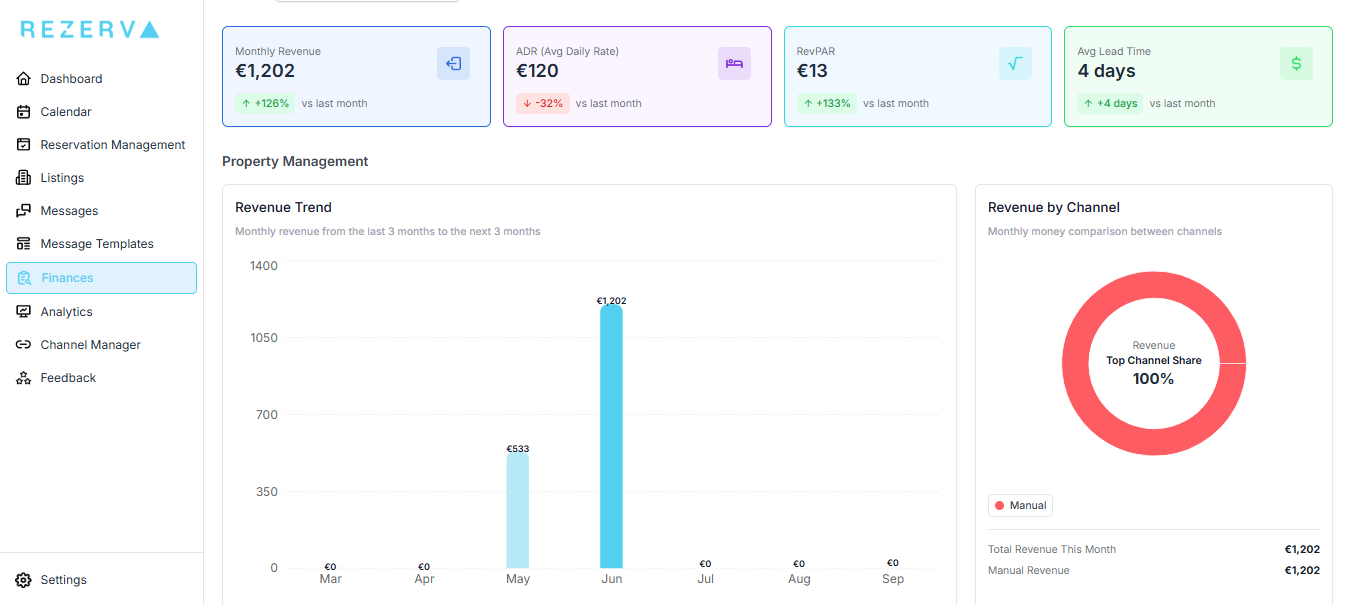
Rezerva's financial dashboard gives you a clear, real-time picture of your rental income. You can see total revenue per property, revenue per channel, and how that breaks down over time. No spreadsheets. No manual calculations. No guessing.
Beyond headline revenue, the dashboard tracks the metrics that actually affect your bottom line. You can see the commission each booking channel takes from your earnings — so you know exactly what Airbnb's 3% costs you versus Booking.com's 15%, in real euros, not percentages you have to calculate yourself. This is one of the most common blind spots for independent hosts: knowing gross revenue but not understanding net revenue by channel.
The dashboard also tracks your average lead time — how far in advance guests typically book your property. This is a powerful but underused metric. A short average lead time (say, 3–5 days) tells you that most of your bookings are last-minute, which might mean your pricing is too high for early planners or that you're not visible enough on channels where people book further ahead. A long lead time (30+ days) suggests strong demand and room to increase your rates. Either way, it's useful to know.
Why It Matters
Most independent hosts have a rough sense of what they earn, but not an accurate one. Airbnb shows you gross booking revenue. Booking.com shows you a different number because their commission structure is different. Neither shows you how the two compare side by side, after fees, over time.
This matters because it directly affects decisions. Should you focus on getting more Airbnb bookings, or would you earn more net revenue from Booking.com despite the higher commission? Is your January pricing too high (short lead time, last-minute bookings only) or just right? Are you actually making more money this quarter than last, or does it just feel that way?
A financial dashboard turns gut feelings into data. And for hosts who want to treat their vacation rental as a business — even a small one — that's the foundation for every smart decision.
How It Works
- Rezerva automatically pulls booking and revenue data from every connected channel.
- Revenue is broken down by property, by channel, and by time period — see this month, last month, or any custom date range.
- Commission per channel is calculated and displayed so you can compare what you actually keep from each platform.
- Average lead time is tracked per property, helping you understand your booking patterns and adjust pricing or availability strategy accordingly.
Key Details
- Revenue tracked per property and per booking channel
- Commission per channel calculated automatically — see your net earnings, not just gross
- Average lead time per property to understand booking patterns
- Filter by date range to compare performance across periods
- Visual charts and clear numbers — no spreadsheets or manual data entry required
- All financial data available from day one, updated in real time as bookings come in
Guest Messaging & Unified Inbox
One inbox for every guest, every channel. Reply in seconds.
What It Does
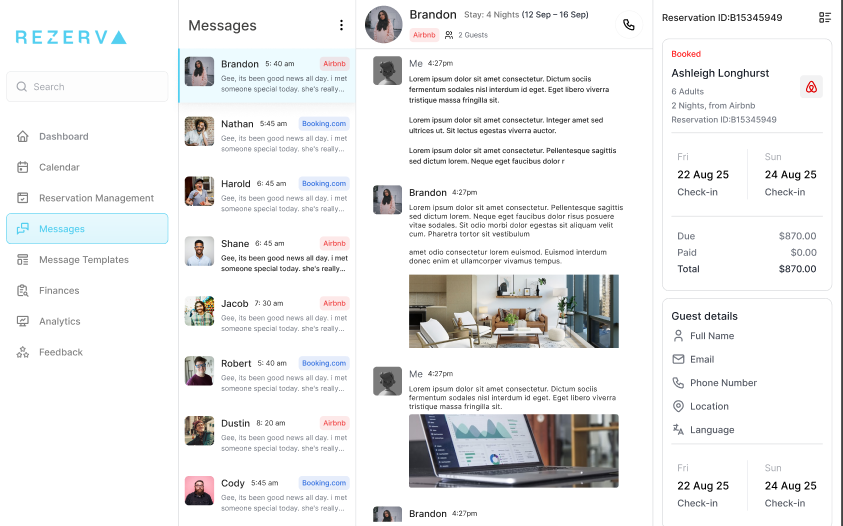
Rezerva's unified inbox pulls every guest message from every connected booking channel into a single view. Messages from Airbnb guests, Booking.com guests, Vrbo guests — they all appear in one list, and you can reply to any of them directly from Rezerva. Your reply goes back to the guest on the original platform, exactly as if you'd replied from the OTA itself. The guest never knows the difference. This is a full two-way sync.
When a guest sends you a message on Airbnb, it appears in Rezerva. When you reply from Rezerva, it appears in the guest's Airbnb inbox. The same applies to Booking.com and every other connected channel. You never need to log into the individual platforms to manage guest communication.
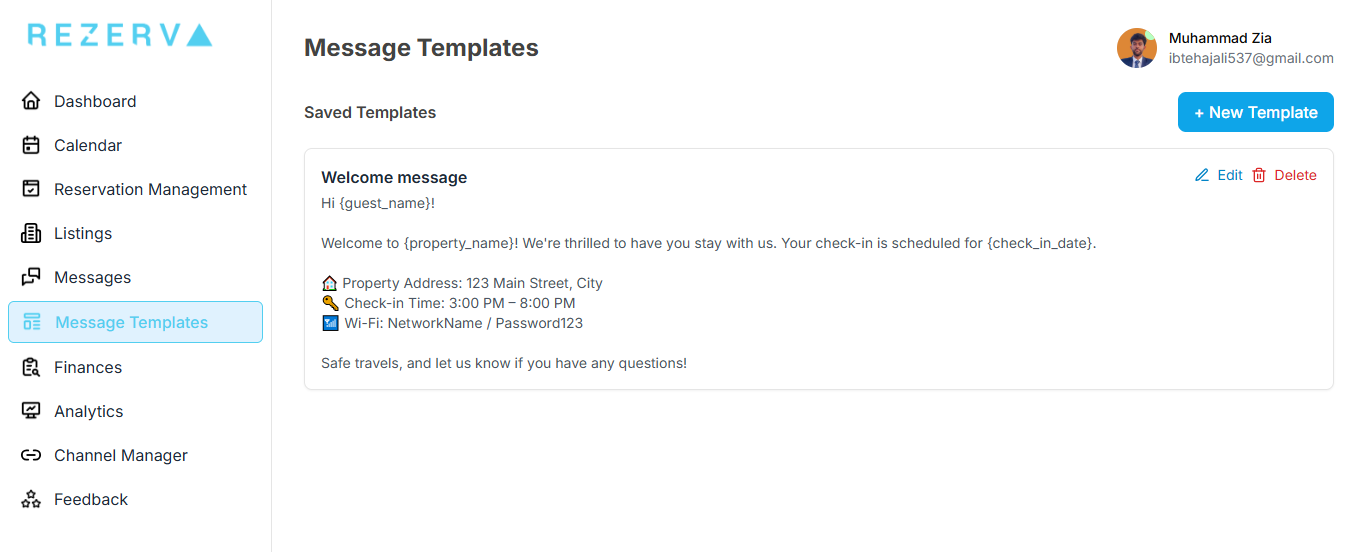
On top of the unified inbox, Rezerva includes message templates — pre-written messages you can save and reuse for the interactions that happen over and over: check-in instructions, Wi-Fi passwords, house rules, checkout procedures, local restaurant recommendations, directions from the airport. Instead of typing the same information for every guest, you select a template, personalise it if needed, and send.
Why It Matters
Response time is one of the single biggest factors in your success as a host. Airbnb explicitly tracks how quickly you reply to guest enquiries, and it affects your search ranking and eligibility for Superhost status. Booking.com has similar response metrics. Guests who message multiple hosts will almost always book with the one who replies first. But staying on top of messages gets harder with every channel you add. An Airbnb message comes to one app. A Booking.com message goes to email. A Vrbo enquiry lands somewhere else entirely. If you're not constantly monitoring all of them, messages slip through the cracks — and a slow reply (or a missed one) can cost you a booking.
A unified inbox eliminates this problem. Every message, one place. And message templates eliminate the other time sink: typing the same check-in instructions, the same Wi-Fi password, the same parking directions for every single guest. Hosts who use templates report saving several hours per week — time that adds up fast, especially during busy seasons.
How It Works
- Guest messages from all connected channels arrive in your Rezerva inbox in real time.
- Each conversation shows the guest's name, booking dates, property, and the channel they booked through.
- Reply directly from Rezerva. Your message is delivered to the guest on the original booking platform via two-way sync.
- Create and save message templates for frequently sent information — check-in details, house rules, directions, Wi-Fi info, and more.
- Select a template, review or personalise it, and send in seconds.
Key Details
- Full two-way messaging sync with Airbnb, Booking.com, and all connected channels
- Reply from Rezerva — your message appears in the guest's OTA inbox
- Every conversation shows guest name, booking details, property, and source channel
- Reusable message templates for check-in instructions, Wi-Fi, house rules, directions, and more
- Save and organise multiple templates for different scenarios
- Works on desktop and mobile — reply to guests from anywhere